
















How to Use AI Tools Like a Pro
Master everyday AI workflows, save valuable time, boost creativity, improve productivity, and complete tasks faster with practical techniques today.

Have you ever wondered why some people finish hours of work in just a few minutes? Have you noticed creators, developers, marketers, and business owners producing better results faster with artificial intelligence? The difference is not simply using AI. It is knowing how to use AI tools like a pro.
If you are new to AI or already experimenting with different platforms, this guide will help you build practical skills that improve productivity without making your work feel robotic. In this article, you will learn proven strategies, common mistakes to avoid, and practical tips that professionals use every day.
At Eiztools, we believe AI should make everyday work easier for everyone. Whether you are writing content, designing graphics, coding applications, researching topics, or managing projects, learning how to use AI tools like a pro can save time while improving the quality of your work.
What Does It Mean to Use AI Tools Like a Pro?
Using AI professionally is not about replacing human creativity. Instead, it is about combining your knowledge with artificial intelligence to work smarter. Professionals know what to ask, how to verify results, and when to edit AI generated content.
The best AI users treat artificial intelligence as an assistant instead of an automatic replacement. They review every response, add their own expertise, and ensure the final work is accurate and valuable.
Learning how to use AI tools like a pro means developing good habits that improve consistency, efficiency, and decision making across different tasks.
Why AI Tools Are Becoming Essential
Artificial intelligence is transforming almost every industry. Businesses, freelancers, students, educators, and developers now rely on AI to complete repetitive work, organize information, and generate ideas much faster than traditional methods.
- Create articles, emails, and marketing copy.
- Generate programming code and debug applications.
- Analyze large amounts of information quickly.
- Create presentations and business documents.
- Edit images and generate creative visuals.
- Translate content into multiple languages.
- Automate repetitive workflows.
- Brainstorm ideas for content, products, and campaigns.
Rather than replacing professionals, AI helps remove repetitive tasks so people can focus on strategy, creativity, and problem solving.
Benefits of Learning How to Use AI Tools Like a Pro
| Benefit | How It Helps |
|---|---|
| Higher Productivity | Complete routine work much faster. |
| Better Quality | Generate drafts and improve them with human expertise. |
| Faster Research | Summarize information and organize ideas efficiently. |
| Improved Creativity | Generate fresh ideas when facing creative blocks. |
| Cost Savings | Reduce time spent on repetitive manual work. |
| Continuous Learning | Discover new concepts, workflows, and problem solving methods. |
Choose the Right AI Tool for the Right Job
One of the biggest mistakes beginners make is expecting a single AI platform to do everything perfectly. Professionals understand that different AI tools are designed for different purposes.
| Task | Recommended AI Tool Type |
|---|---|
| Writing articles | AI writing assistants |
| Programming | AI coding assistants |
| Image creation | AI image generators |
| Video editing | AI video tools |
| Research | AI research assistants |
| Data analysis | AI analytics platforms |
Exploring multiple categories of AI software helps you understand which solution delivers the best results for each workflow instead of depending on one application for every task.
Develop the Skill of Writing Better Prompts
The quality of AI output depends heavily on the quality of your instructions. This is why prompt writing has become one of the most valuable digital skills today.
Instead of giving short requests like "Write a blog," provide detailed context about your audience, goals, tone, format, and desired outcome. Better prompts produce better answers.
For example, instead of writing:
- Write an article about SEO.
Try something more detailed:
- Write an SEO friendly beginner guide about technical SEO for small business websites using simple language, practical examples, tables, and frequently asked questions.
This simple improvement dramatically increases the quality of AI generated content and is one of the fastest ways to learn how to use AI tools like a pro.
Always Verify AI Generated Information
Even advanced AI models occasionally make mistakes or provide outdated information. Professionals never publish AI generated content without reviewing it carefully.
Before using AI output, always verify:
- Facts and statistics.
- Names, dates, and locations.
- Technical instructions.
- Medical or legal information.
- Business recommendations.
- External references and sources.
Combining AI speed with human judgment creates trustworthy, accurate, and professional quality work.
You can also explore more productivity resources and practical utilities on the Eiztools platform to improve your daily workflow.
Follow a Simple Workflow to Use AI Tools Like a Pro
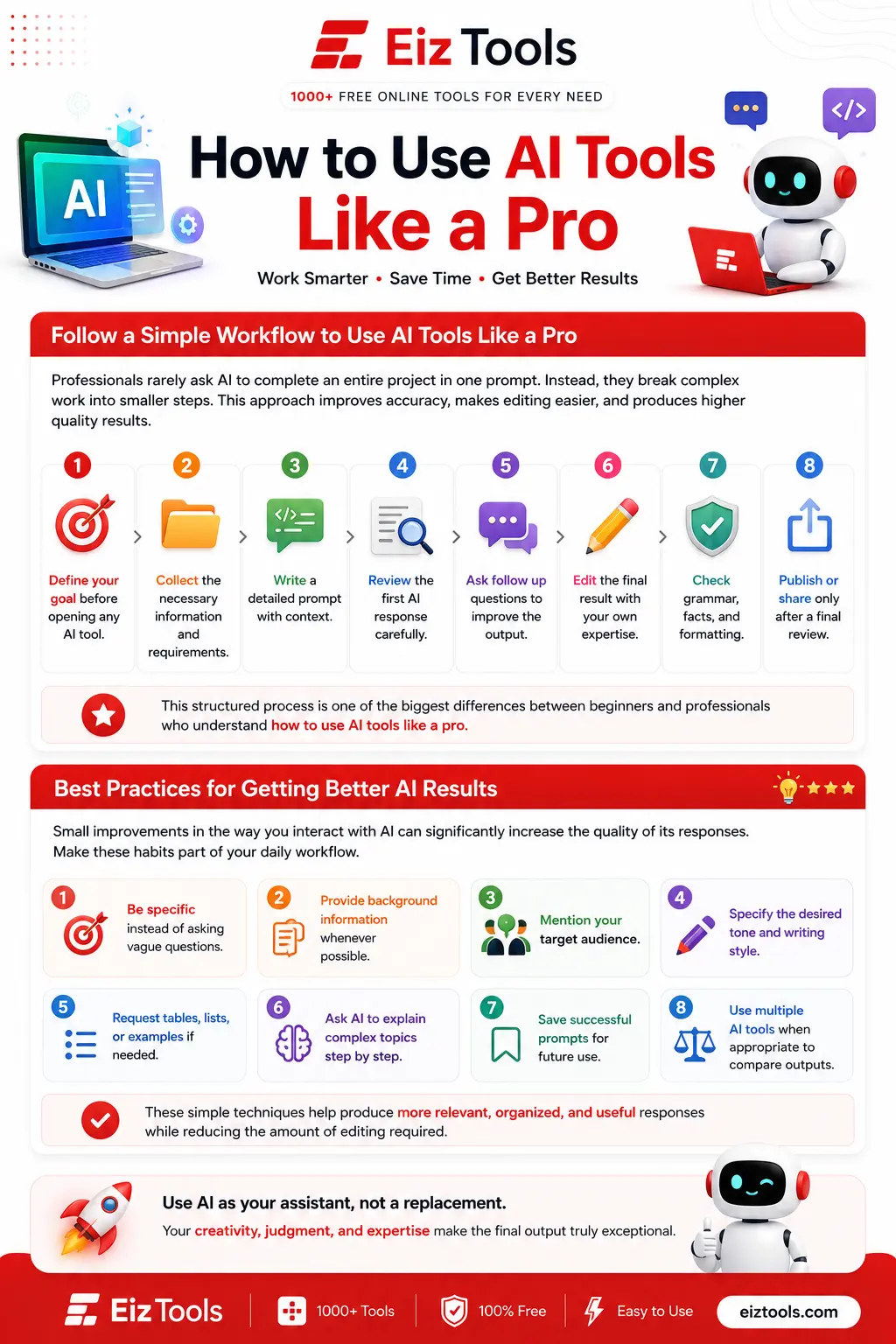
Professionals rarely ask AI to complete an entire project in one prompt. Instead, they break complex work into smaller steps. This approach improves accuracy, makes editing easier, and produces higher quality results.
- Define your goal before opening any AI tool.
- Collect the necessary information and requirements.
- Write a detailed prompt with context.
- Review the first AI response carefully.
- Ask follow up questions to improve the output.
- Edit the final result with your own expertise.
- Check grammar, facts, and formatting.
- Publish or share only after a final review.
This structured process is one of the biggest differences between beginners and professionals who understand how to use AI tools like a pro.
Best Practices for Getting Better AI Results
Small improvements in the way you interact with AI can significantly increase the quality of its responses. Make these habits part of your daily workflow.
- Be specific instead of asking vague questions.
- Provide background information whenever possible.
- Mention your target audience.
- Specify the desired tone and writing style.
- Request tables, lists, or examples if needed.
- Ask AI to explain complex topics step by step.
- Save successful prompts for future use.
- Use multiple AI tools when appropriate to compare outputs.
These simple techniques help produce more relevant, organized, and useful responses while reducing the amount of editing required.
Use AI Responsibly and Ethically
AI is a powerful assistant, but responsible usage is essential. Professionals understand that artificial intelligence should support human decision making rather than replace it completely.
Keep these ethical practices in mind:
- Protect sensitive personal and business information.
- Respect copyright and intellectual property.
- Avoid publishing AI generated content without reviewing it.
- Give proper credit when required.
- Use AI to enhance creativity rather than copy someone else's work.
Responsible AI usage builds trust with readers, customers, and clients while protecting your reputation.
Common Mistakes to Avoid
Many users fail to get the best results because they repeat the same mistakes. Avoiding these issues will help you work more efficiently.
| Common Mistake | Better Approach |
|---|---|
| Using very short prompts | Provide clear instructions and context. |
| Trusting every AI response | Verify important facts before using them. |
| Skipping human editing | Review and personalize every output. |
| Using one AI tool for everything | Select specialized tools for specific tasks. |
| Ignoring privacy | Never upload confidential information unnecessarily. |
| Expecting perfect results instantly | Refine prompts through multiple iterations. |
Real World Examples of AI in Everyday Work
Learning how to use AI tools like a pro becomes easier when you understand practical use cases. Professionals across different industries rely on AI every day.
- Content creators generate article outlines, titles, and social media captions.
- Developers debug code, explain functions, and automate repetitive programming tasks.
- Designers create images, mockups, and creative concepts.
- Digital marketers research keywords, write ad copy, and analyze campaign performance.
- Students summarize research papers and simplify complex subjects.
- Business owners prepare reports, customer emails, meeting notes, and business plans.
These examples show that AI is valuable across many professions when used thoughtfully and responsibly.
Beginner vs Professional AI Users
| Beginner | Professional |
|---|---|
| Uses short prompts. | Writes detailed instructions with context. |
| Accepts the first answer. | Refines responses through multiple prompts. |
| Rarely checks accuracy. | Verifies facts before publishing. |
| Uses one AI platform. | Selects different tools for different tasks. |
| Depends entirely on AI. | Combines AI with human expertise. |
| Focuses only on speed. | Balances speed, quality, and accuracy. |
Keep Learning as AI Continues to Evolve
Artificial intelligence changes rapidly. New models, features, and workflows appear throughout the year, making continuous learning essential for anyone who wants to stay productive.
Read trusted resources, experiment with different tools, practice writing better prompts, and regularly update your workflow. The more experience you gain, the easier it becomes to understand how to use AI tools like a pro and apply those skills to real world projects.
Frequently Asked Questions
1. What is the best way to start using AI tools?
Begin with one or two AI tools that match your daily tasks. Learn their core features, practice writing detailed prompts, and gradually explore more advanced capabilities as you become comfortable.
2. Can AI tools replace human work?
No. AI tools are designed to assist people, not replace human expertise. They help automate repetitive tasks, generate ideas, and improve productivity, but human judgment, creativity, and decision making remain essential.
3. Why do AI tools sometimes give incorrect answers?
AI models generate responses based on patterns in their training data. They can occasionally produce inaccurate or outdated information, so important facts should always be verified before publication or use.
4. How can I improve AI generated content?
Provide clear instructions, include relevant context, define your target audience, specify the desired tone, and review the output carefully. Asking follow up questions usually produces much better results.
5. Which industries benefit the most from AI tools?
Almost every industry benefits from AI, including marketing, education, software development, healthcare, customer support, finance, design, content creation, and business management.
6. Is it safe to upload confidential information to AI tools?
It is generally recommended not to upload sensitive personal, financial, legal, or confidential business information unless you fully understand the platform's privacy policies and security measures.
7. How long does it take to learn how to use AI tools like a pro?
Most beginners can become comfortable within a few weeks of consistent practice. Developing advanced prompting, workflow optimization, and verification skills takes ongoing learning and real world experience.
Artificial intelligence is changing the way people work, learn, and create. The biggest advantage comes not from simply using AI but from knowing how to use AI tools like a pro. By choosing the right tools, writing better prompts, verifying information, and combining AI with your own expertise, you can produce faster, smarter, and higher quality results.
Whether you are a student, freelancer, developer, marketer, business owner, or content creator, building strong AI skills today will help you stay competitive as technology continues to evolve. The more you experiment, refine your workflow, and keep learning, the more value you will gain from artificial intelligence.
Thank you for taking the time to read this guide on how to use AI tools like a pro. We hope it helps you work more efficiently and confidently with modern AI technology.
Join the Eiztools community to discover free online tools, practical tutorials, productivity resources, and the latest technology updates. You can also explore our growing collection of AI and utility tools by visiting the Tools section.
Don't forget to follow Eiztools on social media, enable push notifications, and subscribe to our newsletter so you'll be among the first to receive new tool launches, feature updates, expert guides, and helpful tips.

Sabir Bepari
Founder of EizTools and a passionate AI enthusiast dedicated to building practical, user-friendly AI tools that simplify everyday tasks.
Join the Newsletter
Get the best new AI tools and tips delivered to your inbox. No spam.
By subscribing you agree to receive emails from EizTools. Unsubscribe anytime.
Follow EizTools
Discussion 0
Join the conversation — share your thoughts, ask questions, help others.
No comments yet. Be the first to share your thoughts!
